This SUMMER will be different from any other SUMMER. Your home will no longer be hot with Beger Cool AEROTECH which comes with the promotion AI Turtle Express Hot Deal for SUMMER not caring about anyoneup to 200 Baht per bucket* No limit on quantity, no matter how hot it gets, we are ready to fight!
// hover effect
const buttons = document.querySelectorAll(‘button’);
buttons.forEach(button => {
button.addEventListener(‘mouseover’, function() {
//
if (this.style.backgroundColor.includes(‘000080’)) {
this.style.backgroundColor = ‘#000066’;
}
});
button.addEventListener(‘mouseout’, function() {
//
if (this.style.backgroundColor.includes(‘000066’)) {
this.style.backgroundColor = ‘#000080’;
}
});
});
// hover effect
const links = document.querySelectorAll(‘a’);
links.forEach(link => {
link.addEventListener(‘mouseover’, function() {
// dark
if (this.style.backgroundColor.includes(’06c755′)) {
this.style.backgroundColor = ‘#059b43’;
}
});
link.addEventListener(‘mouseout’, function() {
// soft
if (this.style.backgroundColor.includes(‘059b43’)) {
this.style.backgroundColor = ‘#06c755’;
}
});
});
Details of the AI Turtle Express Hot Deal for SUMMER with Beger Cool AEROTECH
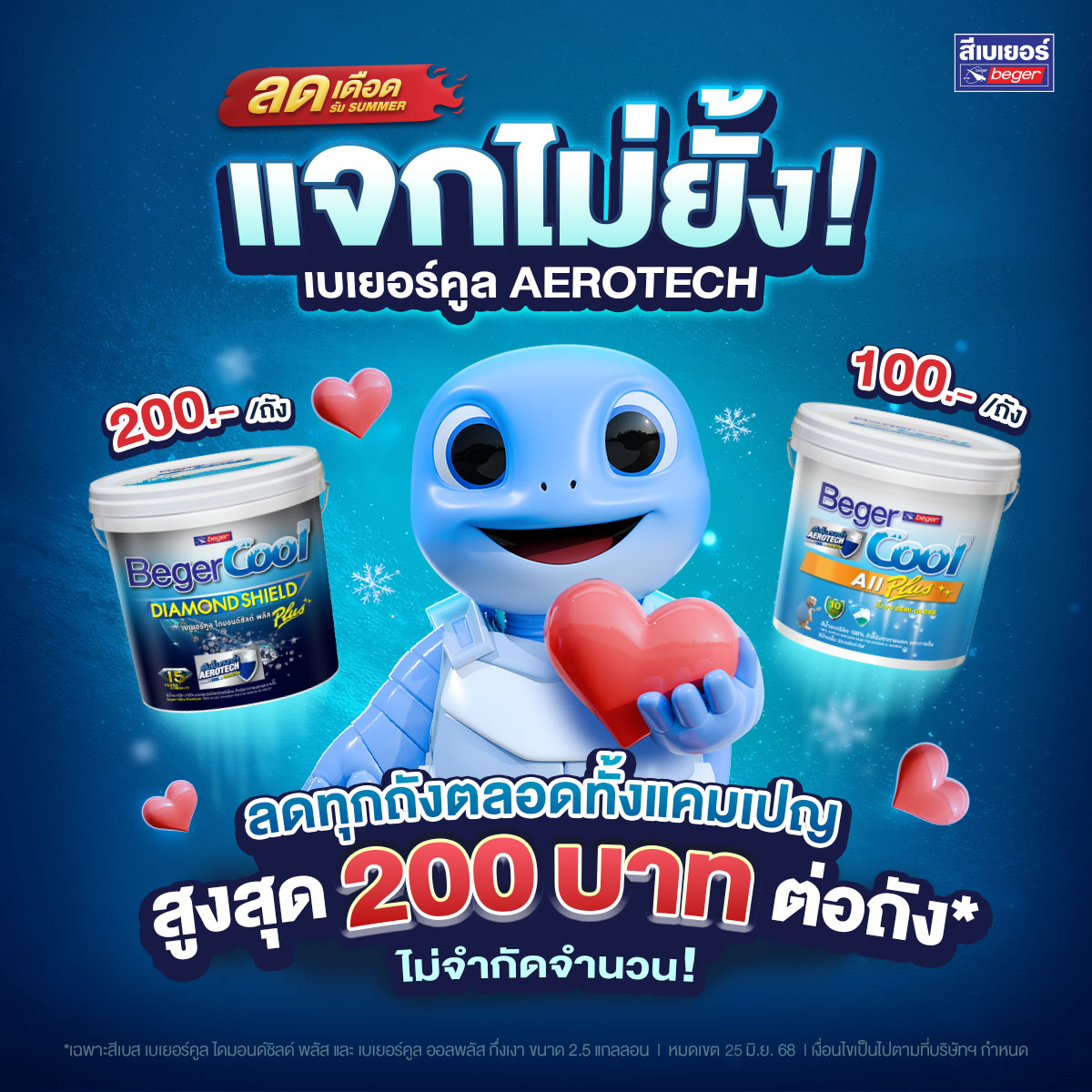
When purchasing base paint* Beger Cool Diamond Shield Plus size 2.5 gallons receive an immediate discount of 200 Baht per bucket
When purchasing base paint* Beger Cool All Plus Semi-Gloss size 2.5 gallons receive an immediate discount of 100 Baht per bucket
Starts from March 11 – June 25, 2025 only!(Only at participating stores, please check with the authorized dealers before purchasing)
This promotion is reserved exclusively for in-store purchases only and does not include any online purchases.
*Promotion applies only to prices not exceeding those set by the company.
*The company reserves the right to participate only for products in the promotion.
Registration steps
and how to use
Registration steps
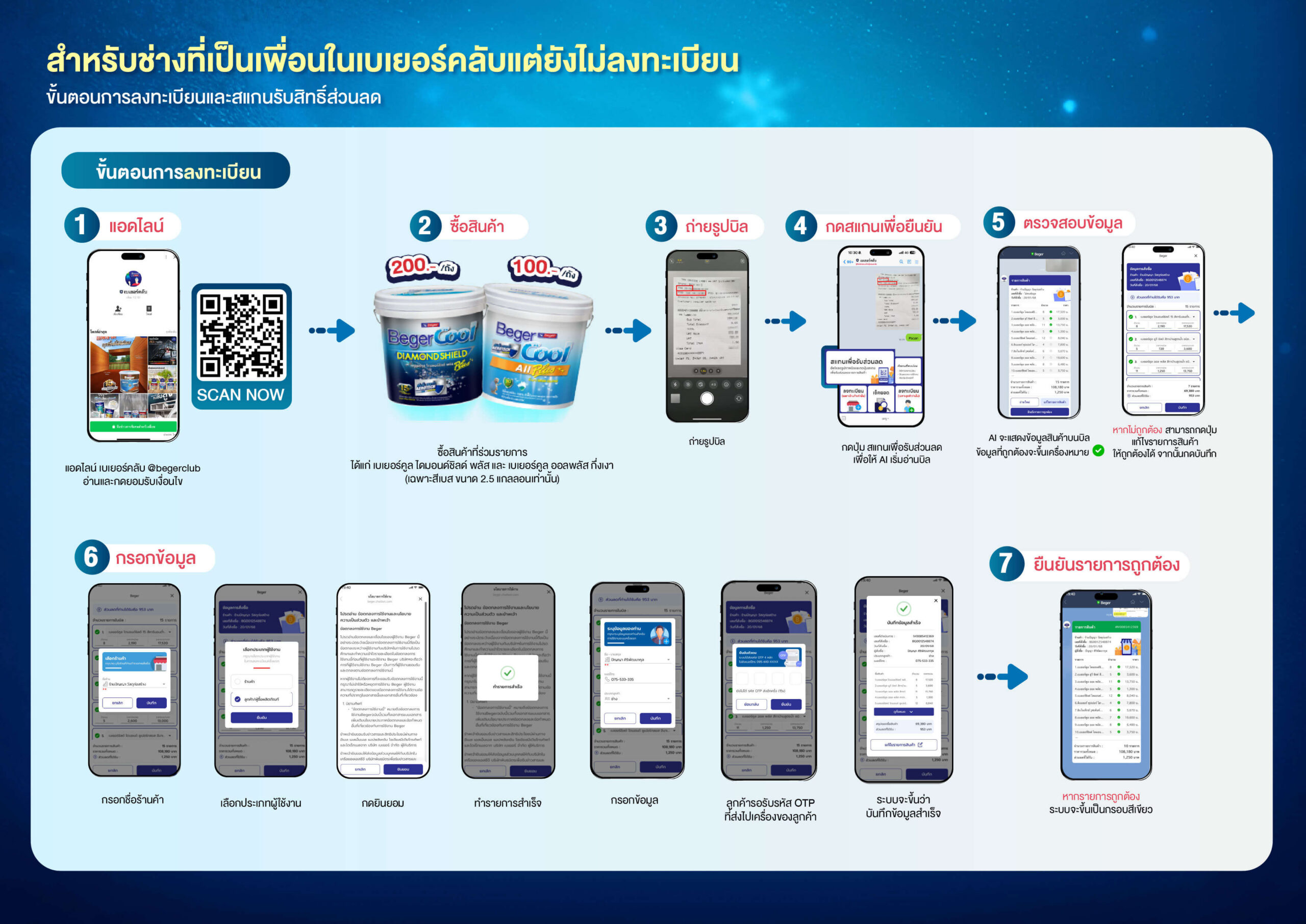
For general customers and painters
- Add LineBeger Club @begerclub
- Purchase products participating in the promotionincluding Beger Cool Diamond Shield Plus and Beger Cool All Plus Semi-Gloss semi-gloss (only base color, 2.5-gallon size)
- Take a photo of the billof the purchased products and click theScan to receive a discount
 A.I. will read your bill, process the product details, and display them in a blue box
- Checkthe accuracy of the displayed product details
- If the information is correctmatching the scanned bill and meeting the conditions of the participating products, there will be a ✅ symbol in front of the product name. You can click theConfirm the details are correct button, and the system will save the information
- If the displayed information is not CorrectYou can click the button Edit Product List You can only edit Product Name and Quantity In case of any edits, the system may take additional time to verify accuracy within 5 – 10 minutes.
5.RegisterAfter confirming the list, if you have never registered before, the system will prompt you to register by simply filling in your first and last name, phone number, and confirming the OTP
How to Use Video
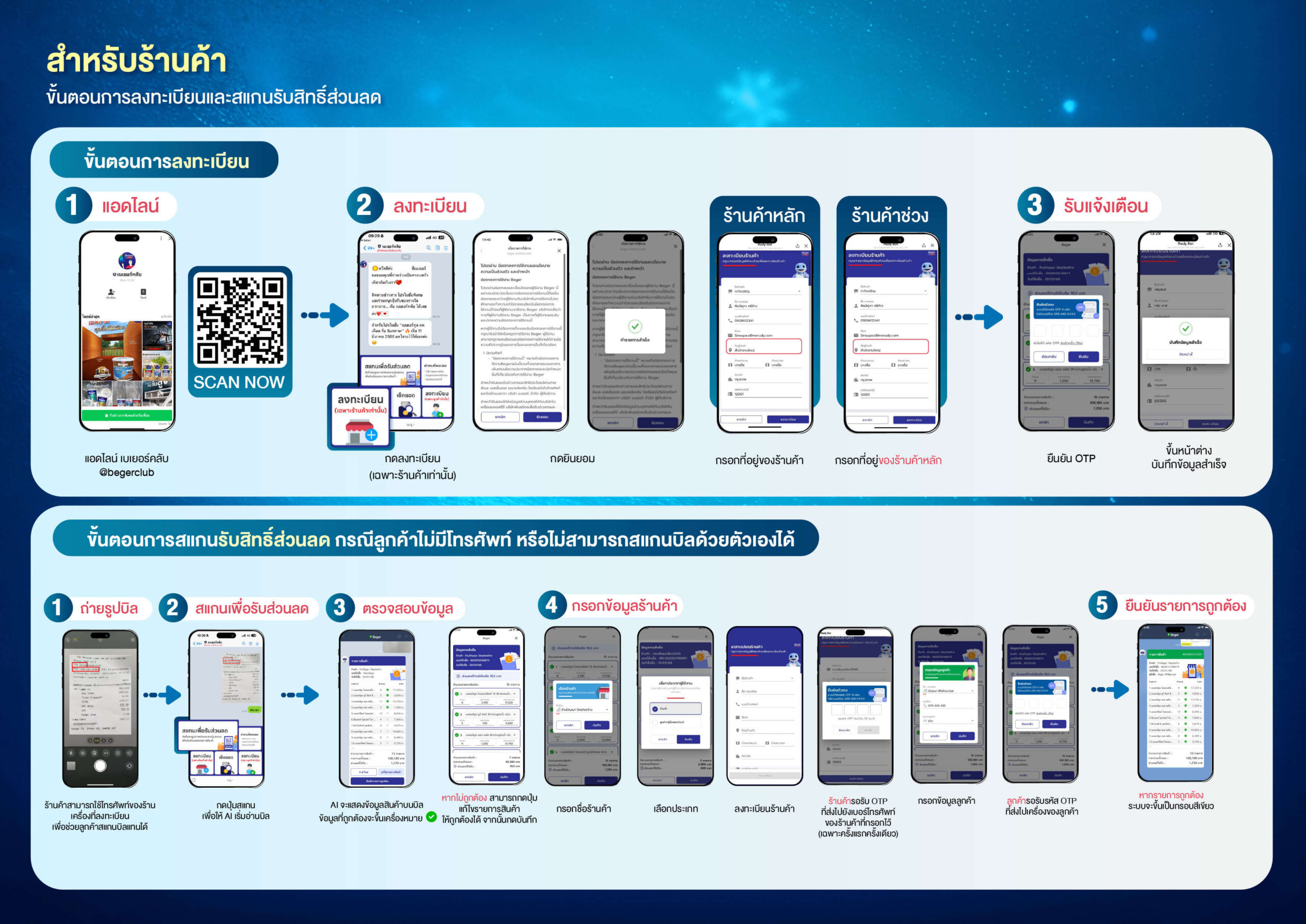
- Add LineBeger Club @begerclub
- Click the button Register (for stores only)
 in the Rich Menu
- ReadTerms of Service and Join Promotions and click to agree
- Fill in the information completelyincludingStore Name Applicant’s First and Last Name Store Address andPhone Number Then the system will send an OTP code to the mobile phone number you registered
- Confirm OTPRegistration is complete, and you will receive notifications for every bill from the store that has been scanned from the aforementioned promotion. This is complete, and every time a receipt from your store is added to the system, you will receive a notification
FAQ Frequently Asked Questions and troubleshooting for basic usage
You will receive a message ” Congratulations, you have successfully received a discount from the Beger Club” and you must see the list of products along with the discounts you received in a green box
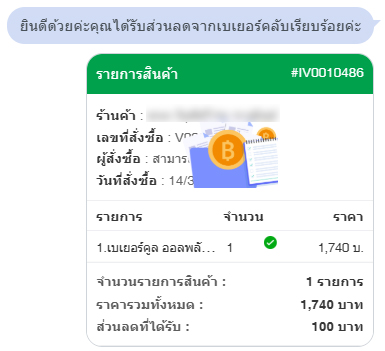
This issue may arise for 2 reasons
- The store name you used for registration does not match the store in Beger’s system To resolve this, try entering your store name without including the words “Ltd.” or “Company” at the beginning, and try typing a space after the store name. If your store has an account with Beger, your store name will appear in the list.
- Your store has never opened a company account with Beger before or is a temporary store In this case, you should contact the main store where you purchase products for further assistance (please study the return conditions of your store with the sales representative in your area)
There are several reasons that may cause your scan to fail, such as your image may not have sufficient resolution, there may be too much light or shadow covering the receipt, or issues with the internet signal. You can try taking the photo again.
You can contact the system administrator (admin) to check and correct the information in the system.
The system checks the receipt number to prevent duplicate receipt submissions and claims. If you are the owner of that receipt and you have never submitted a photo to the system before, you can inform the system administrator (admin) for further verification.
Yes, the system is configured to allow stores to use multiple IDs in case there are several caretakers responsible for the store.
Yes, you can take a photo of the receipt from the main store where you purchased the products and register as a buyer.
No, you must take the receipt on the date you purchased the products. We will consider the date on the receipt along with the date you successfully completed the transaction in the system.
Yes, during the receipt photo-taking and scanning process, if the information read by the AI is incorrect, you can edit the product name, quantity, and price. However, if you choose to edit, the system will send a verification request to the system administrator (admin), which may take 5-10 minutes or longer. The administrator’s decision on approval rights is final.
For security reasons, in this case, please use another mobile phone to register for the promotion instead of the original device.
No, this promotion is reserved exclusively for in-store purchases and cannot be used for online purchases.
This can occur for several reasons, such as 1. The product is not listed in the promotional items 2. The product information is incorrect 3. The product price is incorrect. For cases 2 and 3, if you find that the AI has read the information incorrectly, you can edit it yourself.
You can have the store or a registered sales staff assist you with the process. However, you must provide your phone number and OTP code to verify that you are the one who made the purchase.
You can inquire via Line @begerclub or the Facebook channel Beger Paint.
Additional conditions:
- Discount rights are applicable only to participating products.
- Monthly prize announcements will be made via Line@ Beger Club every month starting from April 16, 2025.
- The approval decision from the system administrator (admin) is final.
- The company reserves the right to change or cancel conditions without prior notice.